
Forms that do something.
An enquiry lands in your inbox and your spreadsheet at once.
Type it once, and let your tools share it: the booking, the invoice, the follow-up.
 I look forward to working with you.
An enquiry lands in your inbox and your spreadsheet at once.
Confirmations, reminders and follow-ups, right on time.
Your calendar, inbox and payment app share what they know.
From a form into a spreadsheet, from a booking into an invoice.
Reminders and follow-ups go out even in your busiest week.
Connected, they share the work instead of making more of it.
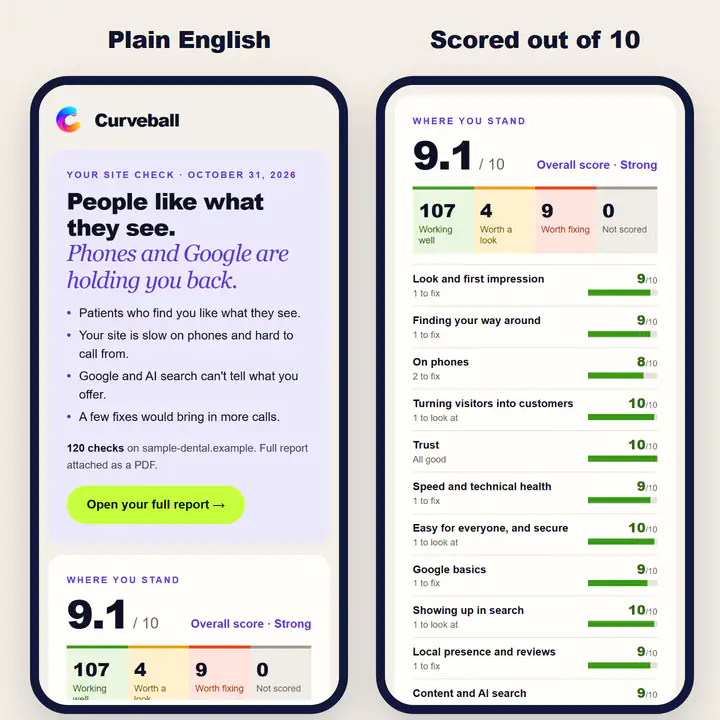
My own Site Check
Someone types in their website. 120 checks run, a score out of 10 is worked out and the report lands in their inbox while they make a coffee.
Try it freeThe task you do every day that a computer could do.
If a tool you can buy already does it, I’ll set that up instead.
The time it saves, and what it costs, agreed first.
Tested, documented and yours.
Priced on the work it takes off you, and agreed before anything starts.
Joining two apps is a small job. Five apps passing details along is a bigger one.
Each “then this happens” is one more step to build and test.
Alerts and a fallback, so a broken step never quietly loses a booking.
Emails that come from your own address need your email account connected properly.
Good automation is boring. You forget it’s there.
The best things to automate are the ones you do the same way every time: copying a booking into an invoice, moving form answers into a spreadsheet, sending the same three emails after every job. If a task needs your judgement, it stays with you. If it only needs your fingers, it’s a candidate.
Automatic emails work best when they come from you, not from a no-reply address nobody trusts. My clients connect their Google account once, with one click, and their website’s enquiry form then sends through their own Gmail. Replies land in their inbox like any other email.
Every automation breaks eventually: a password changes, an app updates, a form field gets renamed. The difference is whether you find out in a minute or a month. So every automation I build is set to tell you, or me, the moment a step fails, and nothing goes missing quietly.
Confirmations and reminders about something a customer booked are part of the service. Marketing emails are different: Canada’s anti-spam law needs people’s permission first, and every message needs a way to unsubscribe. I keep the two apart, so your automations stay on the right side of the rules.
Curveball runs on the same kind of automation I build for clients. Every free Site Check runs its 120 checks, has each problem it flags double-checked on the live website, and emails the finished report, without me touching it. Clients get a monthly re-check email that comes round on its own, and every Monday a draft blog post is waiting for me to approve.
Anything you do the same way every time: copying details between tools, sending the same emails, chasing the same forms. If it needs your judgement, it stays with you.
Usually not. Most of the time I connect the tools you already pay for.
A small connection can take days; bigger ones take longer. The plan says when, before anything starts.
It depends on the job. Connecting tools you already pay for usually costs less than new software, and the quote comes first.
Emails that send themselves at the right moment: a confirmation when someone books, a reminder the day before, a thank-you and a review link after. You write them once; they go out every time.
Not if it handles the right jobs. Customers don’t mind an instant confirmation. They mind waiting two days for one. The personal parts, like the call, the quote and the follow-up chat, stay with you.
Businesses collect software one problem at a time, and even big companies use barely half of what they pay for. A yearly check-up beats a bigger tool.
Your free Site Check: 120 checks, in your inbox in minutes.
or
I look forward to talking with you.